TI-84 for IB Math (AA & AI): What’s Allowed and How to Use It
TI-84 for IB Math AA & AI: calculator rules for Paper 1/2/3, Press-to-Test mode, and the GDC skills IB examiners expect. The complete IB guide.
TI-84 for IB Math AA & AI: calculator rules for Paper 1/2/3, Press-to-Test mode, and the GDC skills IB examiners expect. The complete IB guide.
TI-84 ERR:DOMAIN error? You’re asking the calculator to do impossible math — like sqrt of a negative. Here are 3 causes and fixes.
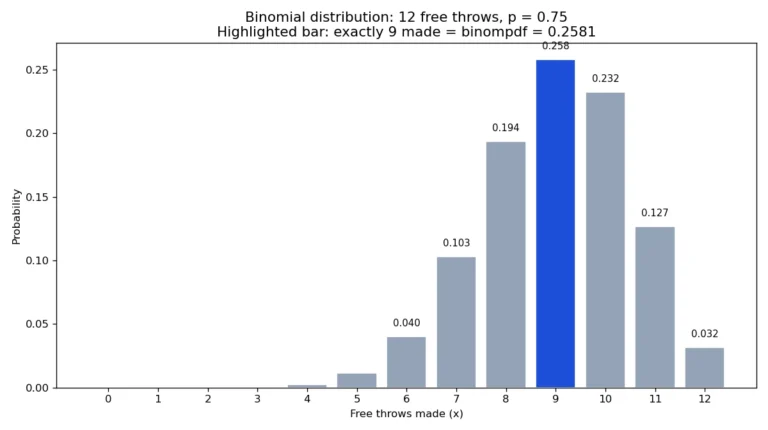
If a statistics question asks for the probability of an exact number of successes — or of “at most” or “at least” a certain number — your TI-84 already has the two functions built for it: binompdf and binomcdf. This guide shows where they live, which one to pick, and how to answer every common…
Use rref( on your TI-84 to solve systems of linear equations: enter the augmented matrix, run reduced row echelon form, and read the solution. Step-by-step.
Hypothesis testing on the TI-84, start to finish: state hypotheses, choose Z-Test vs T-Test, read p-values, apply the reject rule, and write conclusions.
TI-84 ERR:INVALID DIM when graphing? It’s usually a stat plot or list mismatch. Here are 4 causes and the exact keystrokes to fix each one.
Quick answer (October 2026): The TI-84 Plus CE remains the proven classroom standard — widely sold, accepted on major exams, and thoroughly documented. The TI-84 Evo was released in April 2026 with a refreshed design and modernized hardware — a confirmed 156 MHz ARM Cortex processor and USB-C charging — and it is approved for…
Quick answer: The TI-84 works as a full scientific calculator: it handles trig, logarithms, scientific notation, powers, and roots — everything a science or math class needs. Its graphing features are simply a bonus on top. But when your exam bans graphing calculators, or you want something cheaper and simpler, a dedicated scientific calculator like…
TI-84 TVM Solver Finance Guide Quick answer: The TI-84 TVM solver lives in the Finance menu (APPS → 1:Finance → 1:TVM Solver). Enter the known values — N, I%, PV, PMT, FV, P/Y, C/Y — move your cursor to the unknown, and press ALPHA then ENTER to solve. For example, a $10,000 loan at 6%…
TI-30XS MultiView Guide Quick answer: Looking for a TI-30XS calculator online guide? The TI-30XS MultiView is Texas Instruments’ scientific calculator with a multi-line display showing input and answer together like a textbook. It handles fractions, powers, trig, and basic statistics. Schools require it for standardized tests like the GED, which permits this model — the…