Binompdf & Binomcdf on TI-84: Binomial Distribution Made Easy
If a statistics question asks for the probability of an exact number of successes — or of “at most” or “at least” a certain number — your TI-84 already has the two functions built for it: binompdf and binomcdf. This guide shows where they live, which one to pick, and how to answer every common question type without mixing them up. You can follow along on our free TI-84 calculator online if your calculator is not in front of you.
Quick answer: Use binompdf(n, p, x) for the probability of exactly x successes, and binomcdf(n, p, x) for the probability of x or fewer successes. Both live in the DISTR menu — press 2nd then VARS. For “at least x”, calculate 1 − binomcdf(n, p, x − 1).
Binompdf vs Binomcdf: Which One Do You Need?
Both functions work with the same three inputs: n (the number of trials), p (the probability of success on one trial, as a decimal), and x (the number of successes). The only difference is what they do with x:
| Question says | Use | What it calculates |
|---|---|---|
| “exactly x” | binompdf(n, p, x) | P(X = x) — one single value |
| “at most x”, “x or fewer”, “no more than x” | binomcdf(n, p, x) | P(X ≤ x) — everything from 0 up to x |
| “at least x”, “x or more” | 1 − binomcdf(n, p, x − 1) | P(X ≥ x) — the top end of the distribution |
| “between a and b” (inclusive) | binomcdf(n, p, b) − binomcdf(n, p, a − 1) | P(a ≤ X ≤ b) |
The one-line memory trick: pdf = a single bar of the distribution, cdf = a stack of bars added together. If the question names one exact outcome, it is pdf. If it names a range, it is cdf — possibly with a subtraction.
Where to Find Binompdf and Binomcdf
Both functions live in the DISTR (distributions) menu:
- Press 2nd, then VARS to open the DISTR menu.
- Scroll down: binompdf( is item 0 and binomcdf( is item A on the TI-84 Plus CE.
- Press ENTER, and the calculator opens a wizard asking for n, p and x. Fill them in, highlight Calculate, and press ENTER.
On older TI-84 models without the wizard, type the values directly inside the brackets, in the order binompdf(n, p, x).
How to Use Binompdf (Exactly)
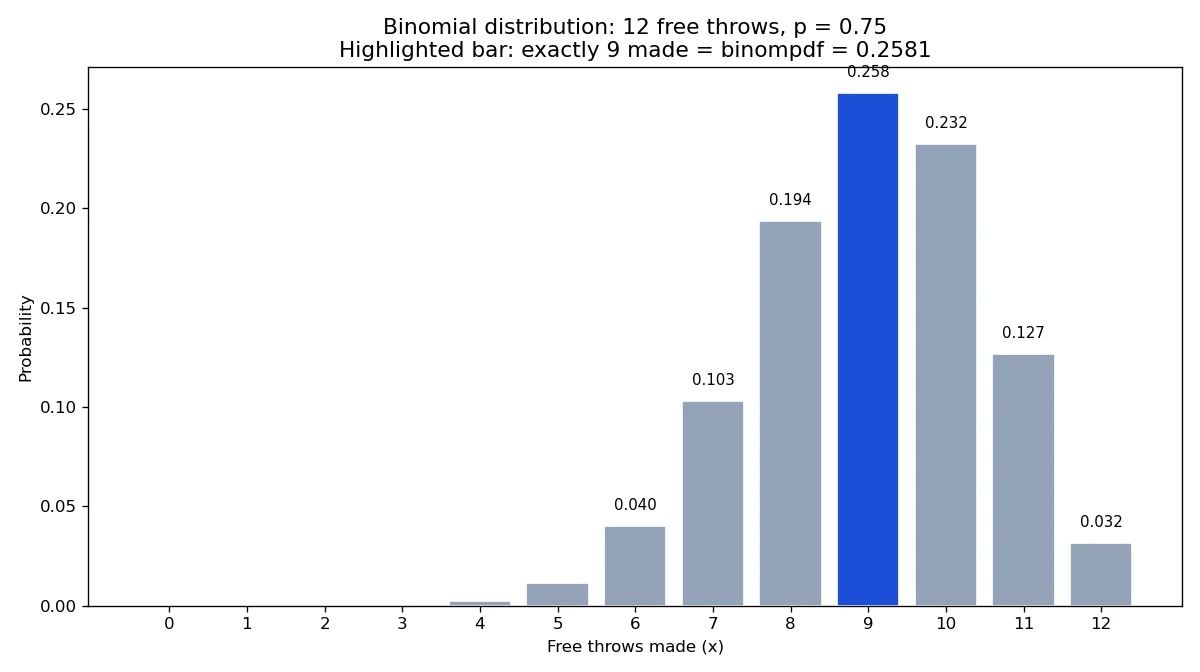
Worked example: a basketball player makes 75% of her free throws. In one game she takes 12 free throws. What is the probability she makes exactly 9?
- Press 2nd → VARS, choose binompdf(.
- Enter n = 12, p = 0.75, x = 9.
- Calculate.
The screen shows 0.2581. So there is about a 25.8% chance she makes exactly 9 of the 12. Notice p is entered as the decimal 0.75, never as 75 — that is the single most common error with these functions.
How to Use Binomcdf (At Most, Up To)
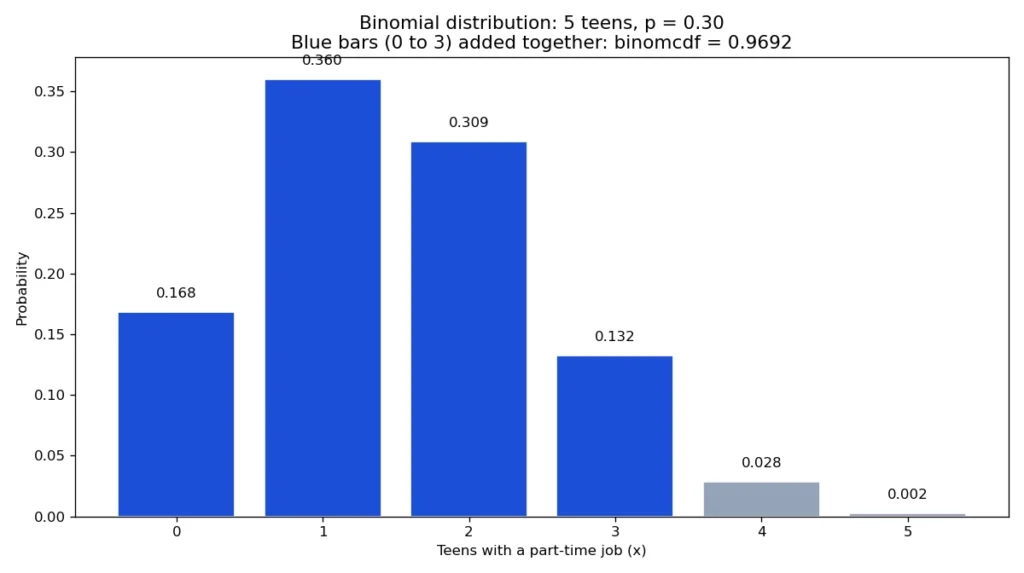
Worked example: a survey found that 30% of teens earn spending money from a part-time job. If 5 teens are selected at random, what is the probability that at most 3 of them have a part-time job? “At most 3” means 0, 1, 2 or 3 — a range, so this is a cdf job:
- Press 2nd → VARS, choose binomcdf(.
- Enter n = 5, p = 0.30, x = 3.
- Calculate.
The screen shows 0.9692 — about a 96.9% chance. The calculator quietly added up the four separate probabilities P(0) + P(1) + P(2) + P(3) for you, which is exactly why binomcdf exists.
“At Least” and “Between” Questions
The TI-84 has no separate “at least” function, so you build it from binomcdf with the complement rule: P(X ≥ x) = 1 − P(X ≤ x − 1). Take the free-throw player again: the probability she makes at least 9 of 12 is 1 − binomcdf(12, 0.75, 8) = 1 − 0.3512 = 0.6488. The part students get wrong is the “x − 1”: because binomcdf already includes its x value, “at least 9” must subtract everything up to 8, not up to 9.
For a range in the middle, subtract the unwanted lower tail: P(4 ≤ X ≤ 9) = binomcdf(n, p, 9) − binomcdf(n, p, 3). Same rule — always subtract up to one below the first value you want to keep.
Mean and Standard Deviation of a Binomial Distribution
Two formulas your teacher will expect alongside these functions: the mean is μ = np, and the standard deviation is σ = √(np(1 − p)). For the free-throw example that is μ = 12 × 0.75 = 9 expected makes per game, with σ = √(12 × 0.75 × 0.25) = 1.5. If you want the spread of an actual data list instead, that is a different job — see our standard deviation guide.
Common Mistakes to Avoid
- Entering p as a percent. p must be a decimal between 0 and 1 (0.75, not 75), or the calculator errors out or returns nonsense.
- Using binompdf for a range. pdf answers one exact value only; any “at most / at least / between” wording needs cdf.
- Forgetting the −1 in “at least” questions. P(X ≥ 9) subtracts binomcdf up to 8, because 9 itself must stay included.
- Swapping n and p. The order is always trials first, then probability, then x.
- Rounding too early. Keep the calculator’s full decimal and round only the final answer (4 decimal places is the usual AP convention).
Frequently Asked Questions
What is the difference between binompdf and binomcdf?
binompdf gives the probability of exactly one value, P(X = x). binomcdf gives the cumulative probability P(X ≤ x), adding up everything from 0 to x. Use pdf for “exactly” questions and cdf for ranges.
Where are binompdf and binomcdf on the TI-84?
Press 2nd then VARS to open the DISTR menu. On the TI-84 Plus CE, binompdf( is item 0 and binomcdf( is item A; select one and the wizard asks for n, p and x.
How do I answer an “at least” question on the TI-84?
Use the complement: P(X ≥ x) = 1 − binomcdf(n, p, x − 1). For example, at least 9 of 12 is 1 − binomcdf(12, 0.75, 8).
Why did my TI-84 give an error or a strange answer?
The usual causes are entering p as a percent instead of a decimal, or entering an x larger than n. Check that 0 ≤ p ≤ 1 and 0 ≤ x ≤ n, and that the order is (n, p, x).
Can I use binompdf for a range like 3 to 7 successes?
No — binompdf covers a single value only. For a range, subtract two binomcdf values: binomcdf(n, p, 7) − binomcdf(n, p, 2).
Does this work the same on the TI-84 Plus CE and older TI-84 Plus?
Yes. The DISTR menu, the function names and the (n, p, x) order are the same; the Plus CE adds a fill-in wizard, while older models have you type the values inside the brackets.
Keep Practising
Binomial questions are one corner of the TI-84’s statistics toolkit. When the data follows a bell curve instead, the sister functions are covered in our Normalcdf guide, and once probabilities turn into conclusions about real data, move on to our Hypothesis Testing guide and T-Test guide.